
2.1.3.1 Dedicated Input/Outputs
The Commander series includes a number of inputs and outputs that have dedicated functions. These include safety-related functions such as emergency stop and limit switches, informational inputs such as slowdown and home, and functional inputs such as external start and (MPG) pulsar inputs.
In this section
- Mechanical input signals
- Emergency stop
- External Stop
- External Start
- Manual pulse generator (MPG) inputs
Mechanical input signals
- Limit Switches
- Slowdown Switches
- Home Switch
- Soft-Limits
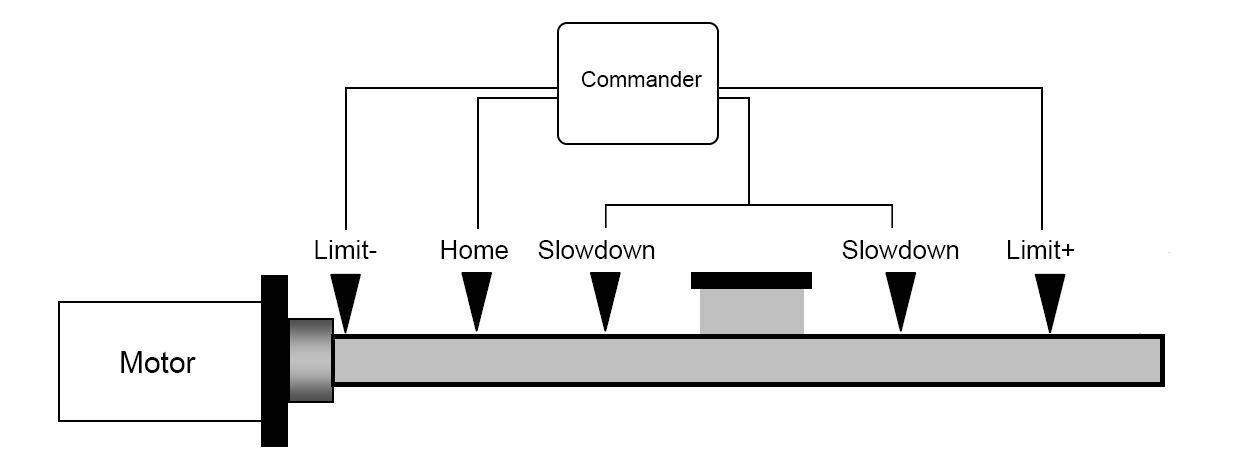
The following signals can be input for each axis:
- +L (Limit +) When this signal turns ON while operating in the positive direction, the motor stops immediately, or decelerates and stops.
- -L (Limit -) When this signal turns ON while operating in the negative direction, the motor stops immediately, or decelerates and stops.
- SD (Slowdown) Used as a deceleration signal or a deceleration stop signal (set by software).
- H (Home) Input signal for a Homing operation.
The input logic for these signals can be changed with software.
The Commander also has a soft-limit function. Soft-limits can be used in a system where physical limits are impossible, or for setting operation limits within the allowable mechanical stroke limits.
Limit Switches
Limit switches, most commonly seen in linear mechanisms to restrict motion to a safe range, are used to identify that the motor has reached its end of travel. If either the positive (L+) or negative (L-) signal becomes active, the Commander controller is instructed to immediately stop all advancement in that direction but allows movement in the opposite direction. It is important to ensure the placement of the positive limit at the end of positive travel and negative limit at the end of negative travel. The polarity of limit inputs is set with the POL[axis](Bit3).
When designing a limit circuit, consider:
- It is especially important that the motor must stop when the signal is active.
- To prevent nuisance limit faults that can stop the system, ensure that electrical noise does not trigger the limits as active.
- To operate in a fail-safe manner, the signal line must be designed to trigger as active when the cable connecting the limit switch to the Commander series of controllers becomes disconnected.
Use these points to determine limit circuit and the active logic level in the system.
Limit error
By default IERR=0, which triggers a limit error MST[axis](bit8~9) when a limit switch is set to active. Once the limit error is set, use the CLR[axis] command to clear the error in ASCII mode or the ECLEAR[axis] command in standalone mode.
When using the end limit during the homing modes, the ERC (deflection counter clear) signal can be setup to clear the limit errors that accrue due to homing automatically.
The limit error states can be ignored by setting IERR=1. In this case, the motor still stops when the appropriate switch is triggered; however, it does not enter an error state.
Slowdown Switches
The slowdown switch (SD) input indicates a point to begin deceleration. If the slowdown switch inputs are active when the motor is operating at HSPD speed and this signal is triggered, the motor starts to decelerate.
The 2-bit SDE[axis] command enables the SD inputs and sets the latching function. By default, SDEX=0 disables the X-axis SD inputs. The inputs can be enabled without a latch function using SDEX=1, or enabled with a latch function SDEX=3.
|
Bit |
Description |
Setting |
|
|
0 |
SD input |
0 - Disabled |
1 - Enabled |
|
1 |
SD latching |
0 - Disabled |
1 - Enabled |
Table 2-1 SDE command
The SDC[axis] command determines the specific operation of the SD input. By default, SDC[axis]=0 sets the operation, when triggered, to decelerate the motor to LSPD without stopping. When SDC[axis]=1, the operation is set to decelerate and stop when the SD input is triggered.
|
Value |
Description |
|
0 |
Decelerate only |
|
1 |
Decelerate and stop |
Table 2-2 SDC command
Triggering the SD input when SDC=1 sets the SD stop flag, MST[axis](bit17). The SD stop flag does not prevent further motion, but can only be cleared using the CLR[axis] command in ASCII mode or the ECLEAR[axis] command in standalone mode.
The SD input, when triggered, causes the motor to slowdown regardless of the direction of travel.
The figure below shows an example of a setup using the slowdown inputs. These inputs are mainly used in homing operations. In this example the axis would move at HSPD, trigger the slowdown input, allowing the motor to decelerate to LSPD, before it triggers the home input.
Other uses for the slowdown input are placing SD limits at each end of travel just before the end limits. This allows for two options. The slowdown inputs function as a soft limit (SDC=1) that decelerates and stops the motion, allowing the end limits to operate as emergency hard end limits. Or they can just allow the motor to decelerate (SDC=0) to LSPD before triggering the end limits. The polarity of the slowdown inputs is set with the POL[axis](Bit6).
Home Switch
The Home (H) switch is used during some homing modes to aid in the detection and location of the zero-position used in absolute positioning operations. For more information see homing operation in section Homing operation and Appendix A: Homing Mode Actions. The polarity of the home input is set with the POL[axis](Bit4).
Soft-Limits
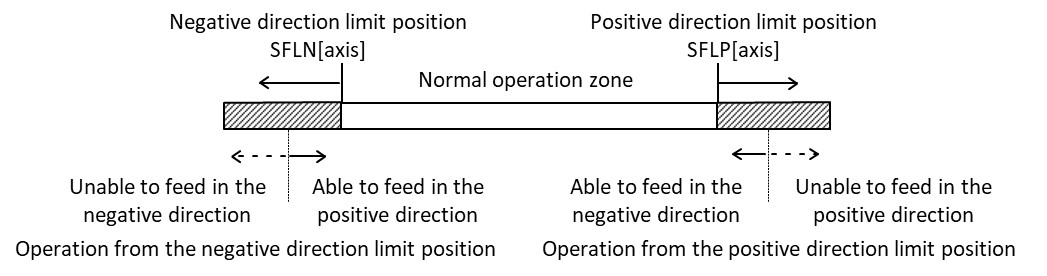
The soft-limit function uses a comparator for a positive direction limit (SFLP[axis]) and a second comparator for a negative direction limit (SFLN[axis]) to stop the axis based on the axis position related to the comparator's results and the operation direction. The SFLSO[axis] command selects the encoder counter (1) or pulse generator counter (0) for the soft-limit axis position. It is safest to use the encoder counter if an encoder is available, as it allows the tracking of the motor even if an outside force moves the motor.
When the soft-limit function is enabled, the axis stops immediately when the motor reaches the soft-limit setting at the low-speed setting (LSPD). At the high-speed setting (HSPD), stopping is executed based on the setting of the SFLSD[axis].
While deceleration stop is selected as the process when soft-limit triggered (SFLSD[axis]=1), when the axis reaches the soft-limit while at high-speed, that axis stops using deceleration at the rate set by DEC. When some other process is specified (SFLSD[axis]=0), or while in a constant (low) speed, that axis stops immediately. While the axis is at or beyond the soft-limit setting, the axis cannot be moved in the direction in which the soft-limit is enabled. It can move in the opposite direction.
Once the parameters are set, the soft-limit function can be enabled by setting SFL[axis]=1 and disabled by setting SFL[axis]=0.
|
ASCII |
|||||
|
Standalone |
⎯ |
⎯ |
⎯ |
⎯ |
⎯ |
Emergency stop
Commander controllers have an emergency stop (/CEMG) input for dedicated use as an emergency stop signal. When in operation, if the /CEMG input goes low or the ESTOP command is sent, all axes stop immediately. No axis can operate while the /CEMG signal is low.
The logical input of the /CEMG input cannot be changed.
Emergency stop (/CEMG) is purely a function of the ASIC and is not controlled by firmware. Emergency stop only stops axis in motion when /CEMG is triggered, or when motion on the axis is started while /CEMG is still active. All other axis are not effected or show an Emergency stop error.
Note: In a normal stop operation, the final pulse width is normal. However, in an emergency stop operation, the final pulse width may not be normal. The motor drivers may not recognize the last pulses, therefore the controller's internal counter may not match the mechanical position. After an emergency stop, it is recommended a homing operation to match the command and mechanical positions is performed.
Emergency stop error
No axis can operate while the /CEMG signal is low.
By default when IERR=0, any axis that is operating when the /CEMG signal goes low or the ESTOP command is sent sets an EMG error flag MST[axis](bit16) for that axis. In addition, any axis that tries to start operating while the /CEMG signal is low sets an EMG error flag for that axis. Any axis with a set EMG error flag cannot operate until the EMG error flag has been cleared. If an axis was not moving when the /CEMG or ESTOP was triggered, the EMG error flag will not be set for that axis, and that axis can operate immediately after the /CEMG input is cleared.
To clear the EMG error flag, use the CLR[axis] command in ASCII mode or the ECLEAR[axis] command in standalone mode.
The EMG error flags are ignored by setting IERR=1. In this case, all axes still stop when /CEMG is triggered or ESTOP command is sent, and all axes can operate again immediately after the /CEMG input is cleared.
External Stop
The external stop (/CSTP) input allows motion to be stopped by taking the /CSTP input low.
The EXSTP[axis] command determines the specific stop operation preformed when the /CSTP input is triggered. By default, the external stop input is disabled (EXSTP[axis]=0), which causes the /CSTP input to have no effect on the motion for that axis. When EXSTP[axis]=1, the operation is set to decelerate and stop when the /CSTP input is triggered. When EXSTP[axis]=2, the operation is set to stop without deceleration when the /CSTP input is triggered.
|
Value |
Description |
|
0 |
Disabled |
|
1 |
Decelerate and stop |
|
2 |
Stop immediately |
Table 2-3 EXSTP command
There are two ways to trigger external stop (/CSTP):
- The CSTP=1 command enables a one-shot pulse with the pulse width of 0.4 μs to be output from the /CSTP pin when the STOP command is sent. This one-shot pulse is input to all Commanders connected to the /CSTP pins, which stops all the axes with EXSTP[axis]=1 or 2. The one-shot pulse re-input to the Commander that has output the one-shot pulse and stops all the axes with EXSTP[axis]=1 or 2 on the sending Commander also.
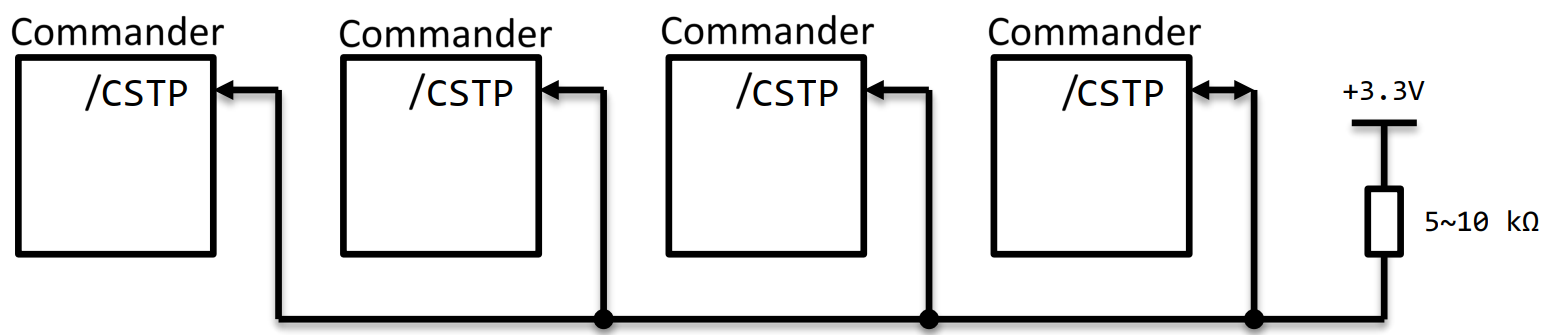
- Input a one-shot pulse with the pulse width of 0.2 μs or more from the outside to /CSTP pin. All Commanders connected by the /CSTP pins input a one-shot pulse to stop the axis with EXSTP[axis]=1 or 2.
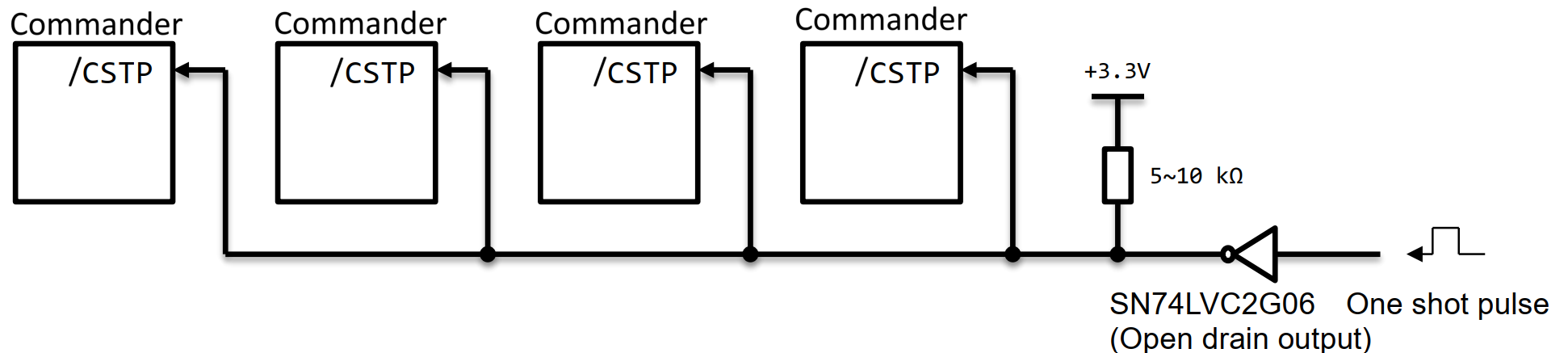
The logical input of the /CSTP input cannot be changed. MST[axis].bit20 returns the current state of the /CSTP input. When EXSTP[axis] is set to 0 for all axes, then /CSTP can be uses as a general purpose input.
The difference between /CSTP and /CEMG is that /CSTP is treated as a normal stop command, the same as sending the STOP command while /CEMG is used to perform an emergency stop on all axes. /CEMG cancels all other commands and motions.
|
ASCII |
CSTP |
|||
|
Standalone |
MST[axis] |
- |
- |
STOP |
External Start
The external start (/CSTA) input allows motion to be started by taking the /CSTA input low.
By default, the external start input is disabled (EXSTA=0), which allows motion to start immediately upon receipt of any motion command. If the external start input is enabled (EXSTA=1), then any motion command sent waits for the /CSTA input to go low before motion is started. The Commander can buffer up to three motions, on a first-in first-out order. They start one at a time each time the /CSTA input goes low.
The logical input of the /CSTA input cannot be changed. MST[axis].bit14 returns the current state of the /CSTA input.
Manual pulse generator (MPG) inputs
An MPG is similar to an encoder in that it is a type of pulse generator that can be used to communicate a speed and direction to the Commander core. The difference between the two is that an MPG commands motion, while an encoder reports the motion.
The MPG input can be used for a number of functions such as:
- A manual pulse generator, which allows for fine adjustment of an axis.
- Cam follower, which allows the axis to follow a cam axis based on its encoder output.
- Electronic gearing, which allows an axis to follow the input commands but at a different rate of speed (faster or slower).
- Encoder Frequency and Impulse Multiplier/Divider
More information on MPG operation can be found in Manual pulse generator (MPG) operation.