
HSPD – High Speed Set Point
Gets/sets the high speed moving [value] for [axis].
Access: Read/Write
Category: Motion
Applies to: All Commander Controllers
ASCII/Standalone HSPD global high speed setting
HSPD[axis] individual axis high speed setting
Standalone HSPD global high speed setting
HSPD[axis] individual axis high speed setting
Syntax:
Read:
HSPD[axis]
HS[axis] * For CMD-4EX and CMD-4ET ASCII mode only
|
Where: [axis] is set to X, Y, Z, U, or not specified to read global value |
Write:
HSPD[axis]=[hspd]
HS[axis]=[hspd] * For CMD-4EX and CMD-4ET ASCII mode only
|
Where: [axis] is set to X, Y, Z, U, or not specified to write global value [hspd] is motion high speed (pps) with range of 1 – 6,553,500, * [hspd] must be set higher than the LSPD value. |
Reply
Command is accepted and executed
Read
Value of HSPD, range of 1 – 6,553,500
Write
OK
Command cannot be processed
An error message is returned. See Error Codes
Example
Read: HSPDX * returns the value set for HSPD for the X axis
Write HSPDZ=50000 * sets motion high speed for Z axis to 50,000 pps
Notes
- HSPD must be larger then 0.
- HSPD and HSPD[axis] must be a positive value. If a negative value is entered, the absolute value is used. Example entering HSPD=-1000 will set HSPD to 1000.
- HSPD and HSPD[axis] must be greater then or equal to LSPD and LSPD[axis].
- Individual high-speed settings will take priority over the global high-speed settings. A global high-speed setting will only be used when either of the following conditions is true:
- The corresponding individual high-speed setting is defined as zero.
- An interpolated motion is being performed.
In the example below, the settings will set both the global speed settings as well as the individual speed setting for the X axis.
HSPD=10000
HSPDX=2000
LSPD=300
ACCX=500
ACC=300
DEC=300
In this example, once a move command is issued, the global speed settings for the low speed and deceleration, as well as the individual X-axis speed settings for the high speed and acceleration, will be used for motion.
- StepNLoop
- When StepNLoop is enabled and not making an interpolated move, high speed units are encoder counts per second.
- When StepNLoop is disabled or interpolated moves are commanded, the high speed units are pulse per second.
- The minimum and maximum acceleration/deceleration values depend on the high-speed and low-speed settings. Refer to Speed Settings for details.
- Only in V127 firmware for CMD-4CR and CMD-4EX, the SSPDM[axis] Speed Range setting must be set to accommodate the desired speed value, or set to 0 for automatic setting. See SSPDM – Speed Range for more information.
- Based on speed magnification resolution, actual speed can very from commanded speed by up to 0.1%.
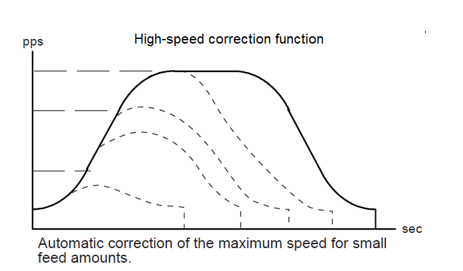
- Sometimes it is not possible to reach the high speed requested by the high speed command based on the acceleration, deceleration times and distance commanded. In the S-curve mode, the CMD-4CR and CMD-4EX will automatically calculate a new HSPD, which is only used for that move and allows for the quickest and smoothest possible move for the requested acceleration, deceleration times and distance commanded.
See also
Motion Settings
ACC, DEC, JKA, JKD, LSPD, PS, SCV, SSPDM