
JKD – Jerk Control Deceleration
Gets/sets the deceleration ratio [value] between S-Curve and linear acceleration for [axis].
The percentage of S-curve the profile contains can be set, with a range from 0 to 100. A setting of 0 is the same as a complete linear profile, and a setting of 100 is the same as a complete S-curve profile.
Access: Read/Write
Category: Motion
Applies to: All Commander Controllers
ASCII JKD[axis]
JKD[axis]=[value]
Syntax
Read
JKD[axis]
|
[axis] is set to X, Y, Z, U |
Write
JKD[axis]=[value]
|
[axis] is set to X, Y, Z, U [value] is the percentage of the S-curve the profile contains (0 - 100) |
Reply
Command is accepted and executed
Read
Returns the percentage of the S-curve the profile contains.
Write
OK
Command cannot be processed
An error message is returned. See Error Codes
Example
Read
JKDY * Returns the percentage of the S-curve the Y axis profile deceleration contains.
Write
JKDX=0 * Sets the X axis profile deceleration to 0% S-curve (linear)
Notes
- When S-curve is disabled, linear acceleration/deceleration is used.
- When S-curve is enabled, changing jerk acceleration (JKA) and jerk deceleration (JKD) allows for fine-tuning of the S-curve profile.
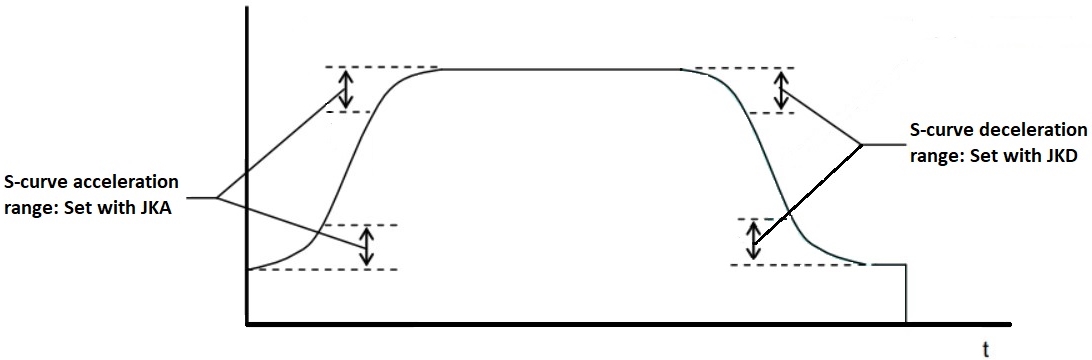
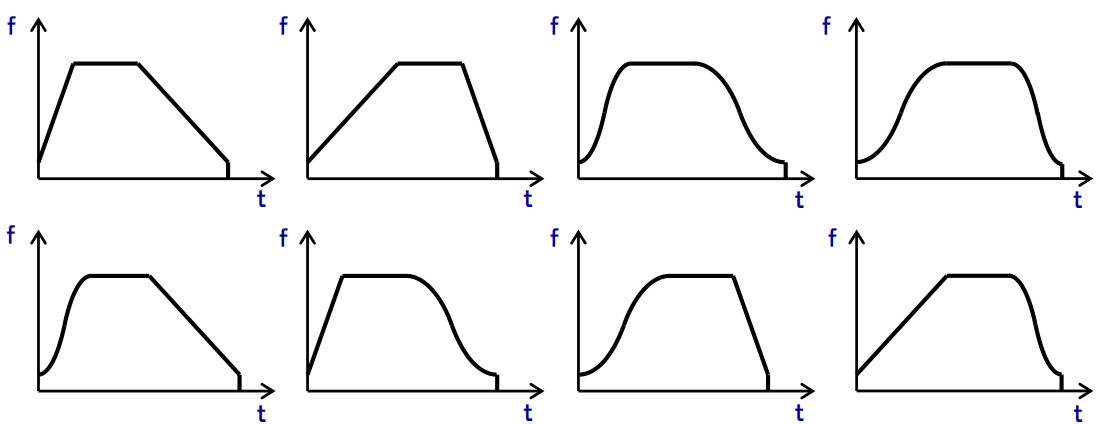
- It is possible to set mixed acceleration/deceleration types in a single profile. Changing the jerk acceleration (JKA) or jerk deceleration (JKD) to 0 makes the acceleration/deceleration linear.
See also
ACC, DEC, HSPD, JKA, LSPD, PS, SCV, SSPDM