
2.1.6 System settings
- ERC (deflection counter clear)
- INP (in-position)
- Input modes and the polarity of the input/output logic
The Commander series of controllers can set and store the following system settings:
|
Command |
Description |
|
ERC[axis] |
Setting the conditions for output of the ERC (error clear) signal. |
|
ERCD[axis] |
Setting the delay time of the ERC signal. |
|
ERCP[axis] |
Setting the on-time of the ERC signal. |
|
EXST |
Enables the use of the external start signal. |
|
IERR |
Disables the error flag for the end-limit and alarm signal. |
|
INP[axis] |
Enables the use of the INP signal. |
|
POL[axis] |
Sets the input modes and the polarity of the pulse, direction outputs, end limits, home, alarm, SD, INP, ERC, EO, encoder, index, and MPG signals. |
|
SCV[axis] |
Enables the use of S-curve acceleration profile |
|
SDC[axis] |
Sets the operation when the SD signal is detected. |
|
SDE[axis] |
Enables the use of the SD signal. |
|
STORE |
Saves the settings of commands to the flash memory. |
System settings
ERC (deflection counter clear)
Commander controllers can be set up to send an ERC (deflection counter clear) signal to clear any external errors from the servo drive. The ERC signal is configured with the following commands:
ERC[axis] command is 2-bit and sets the output condition of the ERC signal. The ERC[axis] command can write a new condition or read the condition based on the chart below.
|
Bit |
Condition for Output |
Setting |
|
0 |
Error Stop |
0: Disabled (Not used) 1: Enabled (Used) |
|
1 |
Homing operation complete |
0: Disabled (Not used) 1: Enabled (Used) |
ERC command
ERCD[axis] command sets the delay time used when a deviation clear signal is sent. The ERCD[axis] command can write a new delay or read the condition based on the table ERCD command below.
|
Value |
Delay |
|
0 |
0 µs |
|
1 |
12 µs |
|
2 |
1.6 ms |
|
3 |
104 ms |
ERCD command
ERCP[axis] command sets the width of the output deviation clear signal. The ERCP[axis] command can write a new pulse width or read the condition based on the table ERCP command below.
|
Value |
Pulse Width |
|
0 |
12 µs |
|
1 |
102 µs |
|
2 |
409 µs |
|
3 |
1.6 ms |
|
4 |
13 ms |
|
5 |
52 ms |
|
6 |
104 ms |
ERCP command
|
ASCII |
|||
|
Standalone |
- |
- |
- |
INP (in-position)
The INP[axis] command determines whether the Commander series of controllers uses the INP (in-position) signal to determine if the motor has reached the requested position. When the INP[axis] function is enabled, the operation completion status is delayed until an in-position signal is received.
The INP[axis] command can be written to set or read the current setting:
|
Value |
Description |
|
0 |
Disabled (Not used) |
|
1 |
Enabled (Used) |
INP command
|
ASCII |
|
|
Standalone |
- |
Input modes and the polarity of the input/output logic
The POL[axis] command is a 17-bit value used to set or read the input mode and/or input/output logic of various signals. Use table POL command below to see descriptions of each bit setting.
|
Bit |
Description |
|||
|
0~2 |
The output modes of command pulse signals |
|||
|
Positive direction operation |
Negative direction operation |
|||
|
PUL output |
DIR output |
PUL output |
DIR output |
|
|
000 |
|
|
|
|
|
001 |
|
|
|
|
|
010 |
|
|
|
|
|
011 |
|
|
|
|
|
100 |
|
|
|
|
|
101 |
|
|
||
|
110 |
|
|
||
|
111 |
|
|
|
|
|
Bit |
Description |
Setting |
||
|
3 |
Logic of End limit signal (+/-L) |
0 Positive logic |
1 Negative logic |
|
|
4 |
Logic of home signal (H) |
0 Negative logic |
1 Positive logic |
|
|
5 |
Logic of alarm signal (ALM) |
0 Negative logic |
1 Positive logic |
|
|
6 |
Logic of deceleration signal (SD) |
0 Negative logic |
1 Positive logic |
|
|
7 |
Logic of in-position (INP) |
0 Negative logic |
1 Positive logic |
|
|
8 |
Logic of deviation counter clear signal (ERC) |
0 Negative logic |
1 Positive logic |
|
|
9 |
Logic of enable signal (EO) |
0 Negative logic |
1 Positive logic |
|
|
10 |
Encoder input direction |
0 Do Not Reverse |
1 Reverse |
|
|
11~12 |
Specification of the feedback pulse signal |
00 x1 |
01 x2 |
|
|
10 x4 |
11 two pulse |
|||
|
13 |
Logic of Z-index signal |
0 Falling Edge |
1 Rising Edge |
|
|
14 |
MPG input direction |
0 Do Not Reverse |
1 Reverse |
|
|
15~16 |
Specification of the MPG input signal |
00 x1 |
01 x2 |
|
|
10 x4 |
11 two pulse |
|||
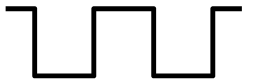


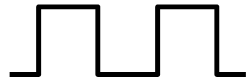


POL command
The polarity can also be set for the digital inputs, digital outputs, and configurable I/O. The DIP command can be used to toggle the polarity of the digital inputs and the DOP can be used to toggle the polarity of the digital outputs. For these 0 = Negative logic, 1 = Positive logic.
The IOP command is 2-bit and can be used to toggle the polarity of the configurable I/O. Bit 0 sets the input logic and Bit 1 sets output logic.
|
Bit |
Description |
Setting |
|
|
0 |
Logic of input setting |
0 Negative logic |
1 Positive logic |
|
1 |
Logic of output setting |
0 Negative logic |
1 Positive logic |
IOP command