
INP – Wait for In Position
Gets/sets the enable [value] of the in-position signal for [axis].
Access: Read/Write
Category: Servo
Applies to: All Commander Controllers
ASCII INP[axis]
Syntax
Read
INP[axis]
|
[axis] is set to X, Y, Z, U |
Write
INP[axis]=[value]
|
[axis] is set to X, Y, Z, U [value] enables or disables the In-Position function 0 = disabled 1 = enabled |
Reply
Command is accepted and executed
Returns 0 or 1 (disabled or enabled)
Write
OK
Command cannot be processed
An error message is returned. See Error Codes
Example
Read
INPY * Returns the enabled status for the Y axis in-position function
Write
INPU=1 * Enables the in-position function for the U axis.
Notes
- The key advantage for INP is in servo systems that are operating in a positioning mode.
- For a stepper application there is no need to use the INP input.
- For servo, if the application is a scanning application where position is not critical, then there is no need for INP.
- What is the INP input and how does it work?
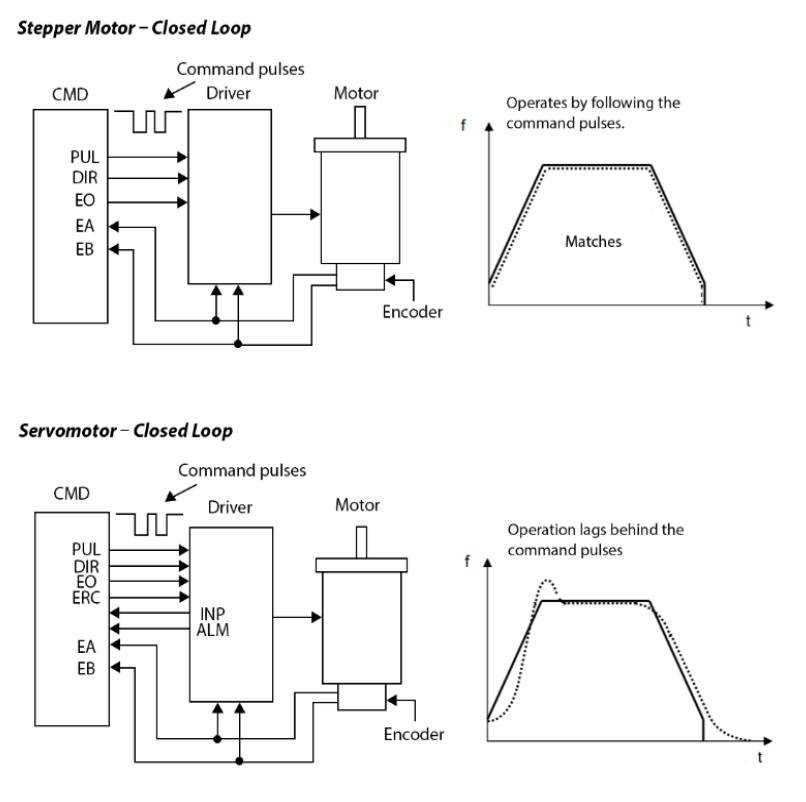
Looking at the picture to the right, notice the difference between the stepper and servo motion profiles. In a servo system there is a lag between where the commanded position is and where the motor actually is.
When you make a motion, without the INP input on (INP[axis]=0) it will show the axis is finished moving as soon as the command pulses are finished being sent, and the next command can be accepted by the controller.
When you make a motion, with the INP input on (INP[axis]=1) it will show the axis is finished moving after the command pulses are finished being sent, and then the INP input is triggered active. (MST [axis] bit 11).
See also
ERC, ERCD, ERCP, POL, SDC, SDE, EXST, IERR