
4.2 Motor Status Screen
The Motor Status screen furnishes a range of information concerning the motion status on each axis. It presents details such as position, speed, motion status, and specific limits and alarms. For additional settings, click  to expand the Advanced Motor Status Screen.
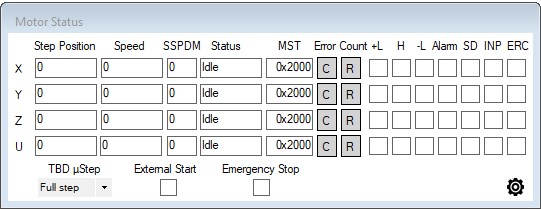
Motor Status Screen Access
Status
|
Display Name |
Description |
Related commands |
|
Step Position |
The value of the feedback pulse counter |
|
|
Speed |
Current operating speed |
|
|
SSPDM |
Current setting of speed range |
|
|
Status |
Status of an axis |
|
|
MST |
Displays the status of an axis in hexadecimal |
|
|
|
Clear error button |
|
|
|
Set value of the command pulse counter to 0 |
|
|
+L |
Positive end of travel limit switch status:
|
MST[axis], Bit 4 |
|
H |
Home switch status:
|
MST[axis], Bit 6 |
|
-L |
Negative end of travel limit switch status:
|
MST[axis], Bit 5 |
|
Alarm |
Current alarm status:
|
MST[axis], Bit 3 |
|
SD |
Slow down limit status, when enabled:
|
MST[axis], Bit 7 |
|
INP |
In-position enable status:
|
MST[axis], Bit 11 |
|
ERC |
Error clear pulse status:
|
MST[axis], Bit 12 |
|
TBD µStep |
(CMD-4EX-SA-TBD only) Sets the µStep rate for the stepper motor drivers. |
|
|
External Start |
External start switch status:
|
MST[axis], Bit 14 |
|
Emergency Stop |
Emergency stop switch status:
|
MST[axis], Bit 15 |
|
X |
X-axis row display |
|
|
Y |
Y-axis row display |
|
|
Z |
Z-axis row display |
|
|
U |
U-axis row display |
|
|
|
Show/hide Advanced Motor Status Screen |
|


Notes:
- Clear pulse counter values – Click the
 button to set value of the command pulse counter 0 for that axis. There is no other condition.
 - Clear error status – Click the
 button to clear the error status of the axis. There is no other condition.
 - The Status window displays text related to the value returned from the MST[axis] command, as shown in the chart below
|
Bit active |
Description |
Status display |
|
None |
Motor not in motion |
Idle |
|
0 |
Motor accelerating |
Accelerating |
|
1 |
Motor decelerating |
Decelerating |
|
2 |
Motor running at speed |
Constant |
|
8 |
Positive end of travel limit activated |
+LIM ERR |
|
9 |
Negative end of travel limit activated |
-LIM ERR |
|
10 |
Alarm input activated |
ALARM ERR |
|
16 |
Emergency stop initiated |
EMG ERR |
|
17 |
Indication the axis stopped via a slow down switch trigger |
SD STOP |
|
18 |
Waiting for In-position signal to finish move |
Wait INP |
|
19 |
Waiting for External Start signal to start move |
Wait Ext Start |