
3.3 Motor Specification Setup
Complete all steps on this page before proceeding to the next topic.
On this page
Configure the motor specification data for Axis A:
- Navigate to the CME Control screen.
- Click the Motor icon to open the Motor Configuration Window.
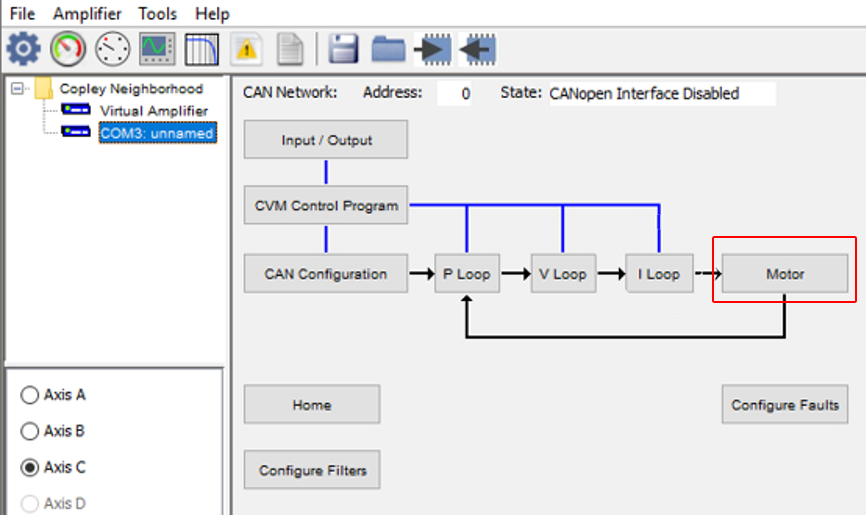
2. Motor Data Entry Window
The Motor Data Entry Window section allows you to enter or adjust motor parameters such as Current ratings, Coil resistance, Inductance, and Encoder details (depending on motor type).
- Select Use Specification Data to enable manual entry of motor parameters.
- Enter the electrical and mechanical specifications of the stepper motor:
- Manufacturer / Model
(Optional documentation fields)
- Motor Inertia
Enter the rotor inertia value using the desired units (kg·cm², g·cm², etc.).
- Resistance
Phase resistance of the motor coils (ohms).
- Inductance
Phase inductance (mH).
- Rated Torque
Continuous torque rating.
- Rated Current
Motor’s rated phase current.
- Basic Step Angle
Step angle per full step (e.g., 1.8°, 0.9°).
The software automatically calculates Full steps/rev from this value.
- µSteps/Rev
Number of microsteps per revolution used in your system.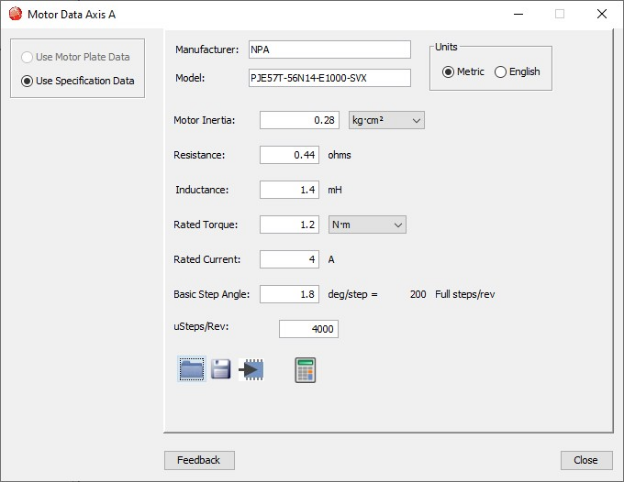
- Use the icons at the bottom of the window to Import, Save, or Flash motor data.
3. Calculate Parameters
After entering all required motor specifications:
Click the Calculator icon.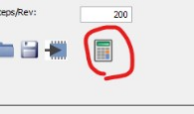
The software automatically computes internal motor parameters using the values entered, including:
- Resistance
- Inductance
- Step angle
- Microstep resolution
These calculations ensure stable current control and accurate motion performance.
4. Review Calculated Settings
After clicking the Calculator icon, a window opens showing the automatically calculated amplifier settings for Axis A.
Calculated parameters include:
- Current Loop Cp Gain
- Current Loop Ci Gain
- Boost Current
- Run Current
- Hold Current
- Time at Boost Current
- Current Ramp
- I Loop / V Loop Filter Settings
Review Calculated Values to ensure they are correct for your motor.
- Click OK to apply the calculated settings.
- Click OK on the confirmation message to save to flash.