
2.1.1 Connect Multiple Commander Cores in a System
Commander controllers allow up to 64 devices to be connected to the same host. If multiple devices are connected to the host, the identification number for each device must be unique. It is possible to use an external trigger to allow synchronization across multiple Commander cores, or to start a defined motion profile on one or more Commander cores.
On this page
Identification Number
The Commander series of controllers allow each device to have a unique identification number, with up to 64 devices connected to the same host. If multiple devices are connected to the host, the identification number for each device must be unique.
By default, all Commander cores are shipped from the factory with identification number 01. The current identification number of a device is found by reading the ID command. The device name always includes the current identification number. For USB communication, the device name is, for example, CMD-4CR-xx where xx is the identification number of the device. For serial communication, the DeviceName is the identification number of the device.
To change the identification number of the device, first store the chosen number using the ID command.
Note: This value must be within the range [00-99].
For example, the command ID=02 can be sent to change the identification number to 02. To save a modified identification number to the flash memory of the device, use the STORE command. The new identification number does not take effect until after a power cycle.
The current version of firmware can be found with the VER command.
Synchronization with External Trigger
It is possible to use an external trigger to start a defined motion profile. This is done by connecting the /CSTA pins as shown in the figure below. The /CSTA line needs an external pull-up resistor to VDD.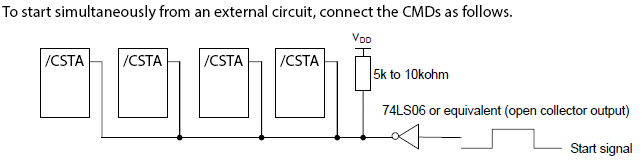
By default, the external start input is disabled (EXSTA=0), which allows motion to start immediately upon receipt of any motion command. If the external start input is enabled (EXSTA=1), then any motion command sent waits for the /CSTA input to go low before motion is started. The Commander series of controllers can buffer up to three movements on a first-in first-out order; they start one at a time each time the /CSTA input goes low.
The logical input of the /CSTA input cannot be changed.
|
ASCII |
|
|
Standalone |
- |
JC add section about EXSTP /CSTP
< Previous Section | Topic Home | Home | Next Section >