
3.11 Position Loop (P Loop) Tuning
Position Loop tuning is the final stage of motor tuning and ensures accurate following of commanded motion with minimal overshoot and optimal stability.
Complete all steps on this page.
On this page
- Configure the Scope
- Verify Channel Setup
- Start Tuning Trace
- Adjust Position Loop Gains
- Gain Adjustment Guidance
- Compare Results
1. Configure the Scope for Position Tuning
Open Scope Axis C and configure the Function Generator:
Function Generator settings
- Apply To: Position
- Function: Square Wave
- Amplitude: 10000 counts
- Frequency: 2 Hz
This square‑wave position command forces the motor to move sharply back and forth, which makes position loop errors easy to see.
Important: The values shown in this guide are examples only. Before starting the Position Loop test:
- Verify that the selected amplitude is appropriate for the available travel range.
- Confirm that the commanded position does not exceed the mechanical limits of the system.
- Ensure limit switches and emergency stop functions are operational.
- Keep clear of all moving components during testing.
Incorrect test settings may result in unexpected motion or equipment damage.
2. Verify Channel Setup for Position Measurement
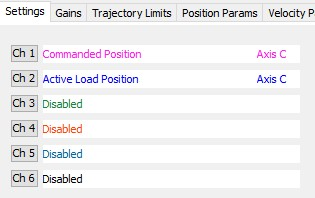
On the Settings tab, confirm the following channel assignments:
- Ch1 – Commanded Position (pink)
- Ch2 – Active Load Position (blue)
- Ch3 – Ch6: Disabled
This ensures the graph compares commanded vs actual position clearly.

Press Start in the Function Generator.
The Scope begins recording motion while the motor follows the position square‑wave.
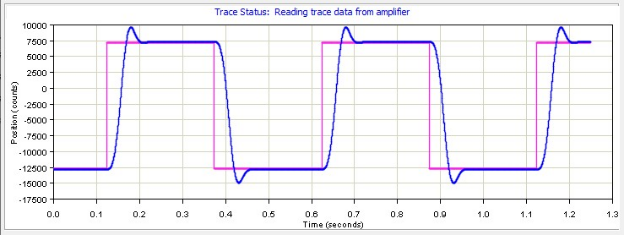
The graph displays:
- Pink: Commanded Position
- Blue: Actual Position
Observe:
- Overshoot
- Undershoot
- Settling time
- Smoothness of transitions

Note: The gain values shown shown in this guide are examples only.
Optimal gain values vary depending on the motor model, load, encoder resolution, mechanical system, and application requirements.
Open the Gains tab (center bottom).
Adjustable Position Loop parameters are:
- Pp (Position Proportional Gain)
- Aff (Acceleration Feed‑Forward)
- Vff (Velocity Feed‑Forward)
Interpretation
Initial values example:
- Pp = 1000
- Aff = 0
- Vff = 16384
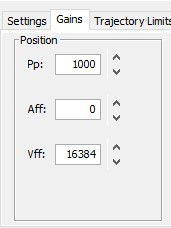
This produced noticeable overshoot and lag.
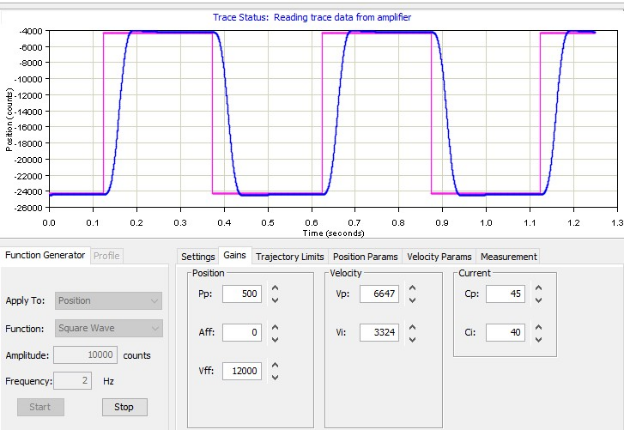
After adjustment:
- Pp = 500
- Vff = 12000

Pp (Position Proportional Gain)
- Increases stiffness and responsiveness
- Too high → overshoot / oscillation
- Too low → sluggish following
- Reducing Pp from 1000 → 500 improved stability
Vff (Velocity Feed‑Forward)
- Helps during fast moves
- Reduces following error
- Too high → overshoot on each transition
- Your tuning reduced Vff for smoother tracking
Aff (Acceleration Feed‑Forward)
- Helps when the motor accelerates quickly
- Leave at 0 unless necessary

6. Compare Results and Repeat if Needed
After adjusting Pp and Vff, press Start again to re-test.
Repeat the fine‑tuning process until:
Desired outcome:
- Blue trace matches pink closely
- No oscillation
- Minimal overshoot
- Smooth transitions
- Minimal undershoot
- Acceptable settling time
- Accurate position tracking