
CIR – Circular Interpolation
Starts a circle interpolation for [axis1] and [axis2].
Access: Write
Category: Circle
Applies to: 2CR, 4CR, 4ED, 4EX, CM3, 8CR
ASCII/Standalone CIR
Syntax
Write
CIR[axis1][axis2][P/N][C1]:[C2]
|
[A1][A2] specifies axis 1 and axis 2 (X, Y, Z, U), |
Reply 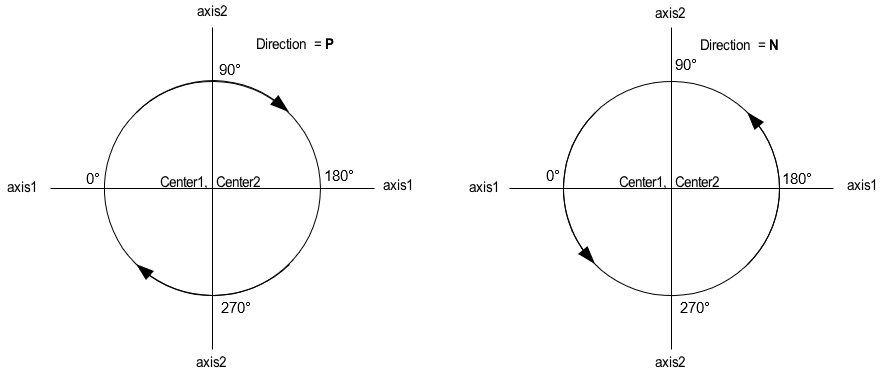
Command is accepted and executed
Write
OK
Command cannot be processed
An error message is returned. See Error Codes
Example
Write
CIRXYP1000:0 * Circular interpolation of X and Y axis, center X = 1000, Y = 0 move in CW direction
Notes
- Any axis can be used for circular interpolation operations.
- Other conditions:
Joystick operation is disabled
Manual pulse generator (MPG) operation is disabled
Current operations are stopped
Error status is off