
2.5 BScript Commands
The full BScript mode requires the commands be entered in the Script Editor in the NPBuilder application:
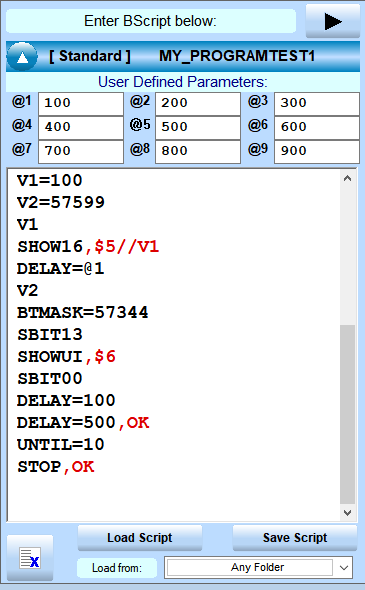
BScript programs use a comma to separate a command with the expected reply value. Each command line ends with a carriage return (non-visible) character, instead of a comma like is done in direct mode.
- BScript or Controller Command, Expected reply
- BScript or Controller Command, Expected reply
- BScript or Controller Command, Expected reply
- BScript or Controller Command, Expected reply
Controller ASCII commands are sent to the motor controller module without modification (other than parameter macros which are swapped in before the commands are sent to the controller).
BScript extension commands are preprocessed by the BScript engine and most do not send an actual Controller ASCII command to the motor controller module. BScript commands do effect code logic (i.e. REPEAT , UNTIL loops) and can communicate with user interface components (in No-Code development) or may be passed to user written code (i.e. Low Code development). When running BScript command programs in the ASCII Script Editor directly in the NPBuilder application it may send data directly to the History window or the Global Memory Storage window.
You can ignore the expected reply if you don't want a Pass/Fail test on the command.
The expected reply is compared to the actual reply as a text string, character for character and not a math comparison.
To force the BScript engine to compare the reply with the expected reply using a math comparison, one of the following Math Macros must be used as a prefix to the expected reply:
<=### reply is less than or equal to expected value
>=### reply is greater than or equal to expected value
*=###|### reply is in the range between the two expected values (inclusive)
==### reply is equal to expected value and force a math comparison
&=### reply ANDed with current Bit Mask (BTMASK command) is equal to expected value
Multiple comparisons can be made using the : (colon) character as an item separator.
Normally the value after the comma (i.e. PX=0,OK ) is compared as a string regardless of what the value is. The reply is compared to the expected value character for character as strings.
You can put a math comparison macro (Macros are always 2 characters long) in front of the expected reply value to force math comparisons. They are as follows:
<=### reply is less than or equal to expected value
>=### reply is greater than or equal to expected value
*=###|### reply is in the range between the two expected values (inclusive)
==### reply is equal to expected value and force a math comparison
&=### reply ANDed with current Bit Mask (BTMASK command) is equal to expected value
Multiple comparisons can be made using the : (colon) character as an item separator.
Command,<=100:>=200
The above would compare the return value and if less than (or equal) to 100 and also greater than (or equal) to 200 it would pass, otherwise it would set a fail flag.
When a math comparison is done (any above) the values are tested to see if they are using either BASIC or C notations for Binary or Hex numbers as well.
App test for the following notations:
0x for C++ Hexadecimal (just x can be used as well)
0B for C++ Binary (just B can be used as well)
&H for Basic Hexadecimal
&B for Basic Binary